Pick & Pack - Touchscreen Terminal for Order Picking
ALL, LOGISTICS, WAREHOUSE, ORDER PICKING
Fast, accurate picking lowers costs and improves customer satisfaction. Our system gives pickers a simple, focused interface for each job while giving supervisors an at-a-glance view of team performance so issues can be spotted and resolved before they slow operations.
This two-part, solution pairs a handheld picker terminal with a wall-mounted supervisor dashboard through Peakboard Hub. It’s built to boost speed, increase accuracy and give supervisors clear, immediate oversight. To view the connected template for the supervisor dashboard click here.
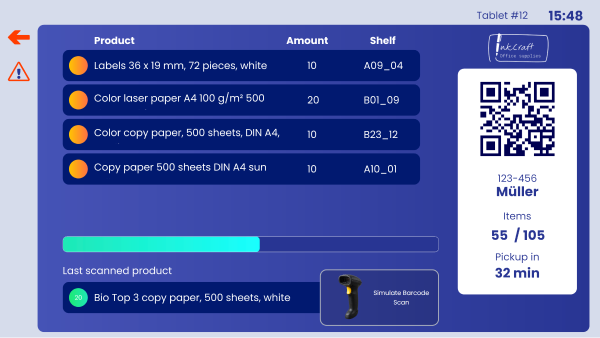
The picker terminal works on handheld devices or fixed floor stations. Workers sign in with a worker ID or scan a badge and immediately see only their open tasks, with article number, article name, storage location and required quantity. When a picker reaches the location, they confirm the pick using an intuitive confirmation dialog that includes a quantity check to prevent mistakes. Completed tasks are pushed to Peakboard Hub instantly, updating an on-screen progress bar that shows tasks completed versus remaining. Color-coded status indicators make it easy to tell open, in-progress and completed tasks apart at a glance.